Register an Online SASSA Account. The South African Social Security Agency (SASSA) provides social grants to eligible people who need financial assistance. These grants are administered on behalf of the Department of Social Development and are intended to support vulnerable individuals and households across South Africa.
SASSA provides several grant-related services online, making it easier for eligible applicants to submit applications, manage their information, and check the progress of their grant applications without always having to visit a SASSA office.
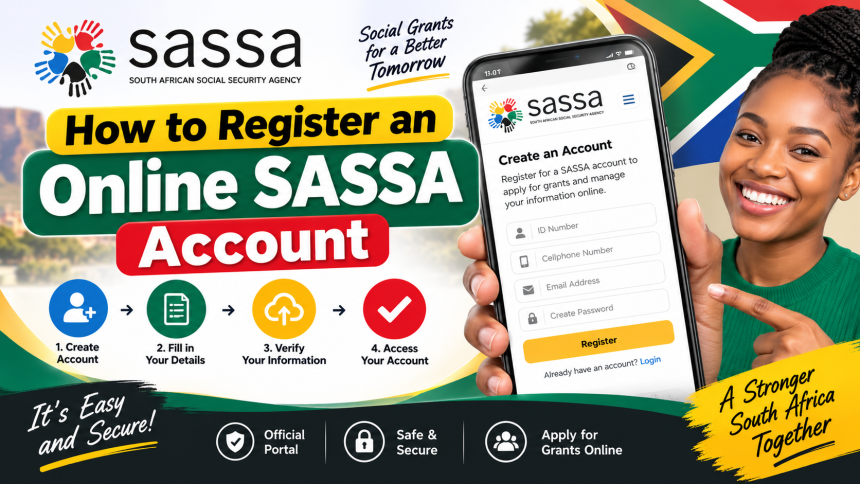
If you want to apply for a SASSA grant online, one of the first steps is to create an online SASSA account. The registration process is straightforward, but applicants should make sure that the information they provide is accurate and that they have access to the email address and mobile number used during registration.
What Is an Online SASSA Account?
An online SASSA account allows applicants to access SASSA’s digital services through the internet. After creating an account, eligible users can sign in and use the available online services, including applying for certain social grants and managing their application information.
Your account details should be kept secure because you may need them whenever you want to access your SASSA application or other online services.
Requirements for SASSA Online Registration
Before registering, make sure you have the information required to complete the registration form. You will generally need personal information such as your full name, surname, South African ID details, contact information, and an active email address.

You should also have access to the mobile phone number and email address you provide. SASSA may use these contact details to communicate with you about your account or application.
Applicants should always provide genuine and accurate information. Incorrect information can cause problems when an application or account is being verified.
How to Register an Online SASSA Account
Follow these general steps to create your SASSA online account:
1. Visit the SASSA Online Services Website
Start by accessing the official SASSA online services platform. Make sure you are using the official SASSA website or online service and avoid websites that ask for unnecessary personal information or claim to guarantee grant approval.
2. Select the Registration Option
Once you reach the online services platform, look for the option to register or create a new account. Select the registration option to begin the account creation process.
3. Complete the Registration Form
You will be asked to provide personal information. Enter your details carefully and make sure that your information matches your official documents.
Depending on the registration form, you may need to provide information such as:
- First name and surname
- South African ID information
- Contact details
- Email address
- Mobile phone number
- Other information requested by the registration system
Check all the information before continuing to the next step.
4. Enter Your Email Address and Mobile Number
Provide an active email address and mobile number that you regularly use. These details are important because SASSA may send account-related or application-related communication through the contact information you provide.
Make sure there are no spelling errors in your email address and that your mobile number is entered correctly.
5. Create a Secure Password
The registration process will require you to create a password for your account. Choose a password that is difficult for other people to guess.
Avoid using simple passwords such as your name, date of birth, or a common sequence of numbers. Do not share your password with anyone, and keep your login information in a secure place.
6. Complete the Registration
After entering the required information, follow the instructions provided by the online registration system to complete your account creation.
If the system asks you to verify your email address, mobile number, or another piece of information, complete the verification process before attempting to log in.
How to Log In to Your SASSA Account
After successfully registering, you can return to the SASSA online services platform and use your login details to access your account.
Enter the required login information, such as your email address or username and password, and select the login option.
If you cannot remember your password, use the available password-reset or account-recovery option rather than creating multiple accounts.
What Can You Do After Registering?
Once your online SASSA account has been created, you may be able to access various online services depending on your eligibility and the services currently available through the platform.
For eligible applicants, the online system can make it easier to submit grant applications and manage application-related information. It can also reduce the need to travel to a SASSA office for certain services.
However, creating an account does not automatically mean that you qualify for a social grant. Grant applications are assessed according to the requirements for the specific grant.
Who Can Apply for SASSA Grants?
SASSA social grants are intended for people who meet the eligibility requirements of the particular grant they are applying for. Depending on the grant, eligibility may involve factors such as citizenship or residency status, age, income, financial circumstances, or other requirements.
South African citizens, permanent residents, and eligible refugees may qualify for certain SASSA grants, provided they meet the relevant requirements.
Applicants should check the requirements for the specific grant before submitting an application.
Important Tips When Registering
When creating your online SASSA account, keep the following points in mind:
- Use accurate personal information.
- Use an email address that you can access.
- Make sure your mobile number is active and correct.
- Create a strong and unique password.
- Never share your password or verification information with strangers.
- Check your information carefully before submitting the registration form.
- Use official SASSA online services whenever possible.
- Be cautious of websites or individuals promising guaranteed grant approval.
Conclusion
Registering for an online SASSA account is an important step for people who want to access SASSA’s online grant services. The process generally involves visiting the online services platform, completing the registration form, providing accurate personal and contact information, creating a secure password, and completing any required verification.
After registration, eligible users can sign in to their account and access the online services available to them. Remember that creating a SASSA account does not guarantee that a grant application will be approved. Applicants must still meet the requirements of the specific social grant they are applying for.