
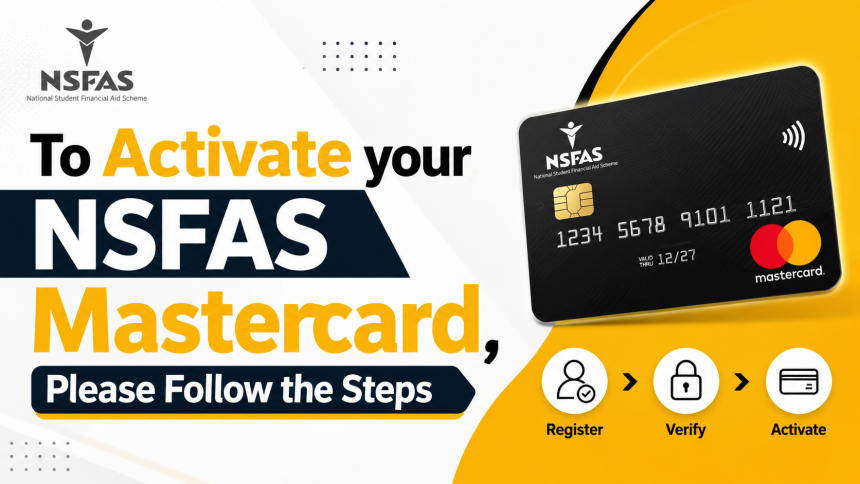
How to Activate Your NSFAS Mastercard. If you have recently been approved for NSFAS funding, one of the most important steps is activating your NSFAS Mastercard. This card allows you to receive your NSFAS allowances safely and conveniently. Before you can start using it, you must complete the activation and identity verification process through the official student app.
In this guide, we explain how to activate your NSFAS Mastercard step by step, including downloading the Tenetech Student App, verifying your identity, receiving your bank account, and collecting your card.
What Is the NSFAS Mastercard?
The NSFAS Mastercard is a bank card issued to eligible students who receive financial assistance from the National Student Financial Aid Scheme (NSFAS). It is linked to a student bank account and is used to receive monthly allowances for accommodation, meals, transport, and learning materials.
The activation process ensures that your account is secure and that your funding is paid to the correct student.
Step 1: Receive the NSFAS SMS

After your NSFAS application has been approved, you will receive an SMS on the mobile number you used during your application.
The SMS contains a secure link to download the official Tenetech Student App. If you have changed your phone number, you should update your contact details with NSFAS as soon as possible.
Step 2: Download the Tenetech Student App

Tap the link in the SMS and install the Tenetech Student App on your smartphone.
This application is designed specifically for NSFAS beneficiaries. It allows you to complete your identity verification, manage your account, and activate your NSFAS banking profile.
Always download the application only through the official link provided by NSFAS to protect your personal information.
Step 3: Register Your Student Number
Open the app after installation and register using your official student number.

Your student number connects your university or TVET college records with your NSFAS funding profile. Double-check that you enter the correct number before continuing.
If your student number is incorrect, the activation process may be delayed.
Step 4: Enter Your Personal Information
Next, complete your personal profile by providing accurate information.
You may be asked to enter:
- Full name
- South African ID number
- Mobile phone number
- Email address
- Residential address
- Other verification details
Make sure every detail matches your official records. Incorrect information may prevent successful verification.
Step 5: Upload Your South African ID
To verify your identity, the app will ask you to upload a clear photo of your South African ID document.
For the best results:
- Take the photo in good lighting.
- Ensure all corners of the ID are visible.
- Avoid blurry or cropped images.
- Check that all text is readable.
A clear ID image helps speed up the approval process.
Step 6: Take a Selfie with Your ID
As part of the security verification process, you must also upload a selfie while holding your South African ID.
This facial verification confirms that the person completing the registration is the same individual shown on the ID document.
Follow the instructions inside the app carefully and ensure your face and ID are clearly visible.
Step 7: Identity Verification
Once you have submitted your documents, the verification process begins.
The system reviews your personal information and verifies your identity using the documents you uploaded.
Verification times may vary depending on application volumes and the accuracy of your submitted information.
If additional information is required, you may receive further instructions through the app or via SMS.
Step 8: Bank Account Assignment
After your identity has been successfully verified, a bank account will automatically be created and linked to your student profile.
This account becomes your official NSFAS bank account and will be used to receive your monthly allowances.
You do not need to open another account unless instructed by NSFAS.
Step 9: Receive Your NSFAS Mastercard
Once your account has been created, your NSFAS Mastercard will be prepared and delivered to your institution.
Depending on your university or TVET college, the collection process may differ.
Generally, students collect their cards from:
- Student support offices
- Financial aid offices
- Registration centres
- Designated campus collection points
Bring your South African ID when collecting your card.
Universities and TVET College Distribution
NSFAS works with approved banking and payment partners to distribute student bank accounts and Mastercard cards.
Different universities and TVET colleges may use different distribution partners depending on their agreements.
If you are unsure where to collect your card, contact your institution’s Financial Aid Office or Student Support Centre for guidance.
Common Activation Problems
Some students experience delays during activation due to simple mistakes.
Common issues include:
- Incorrect student number
- Wrong phone number
- Blurry ID photos
- Selfie verification failure
- Incomplete personal details
- Delayed identity verification
Review all information carefully before submitting your application to avoid unnecessary delays.
Important Tips
To ensure a smooth activation process:
- Use the phone number registered with NSFAS.
- Upload high-quality images.
- Complete all required verification steps.
- Keep your personal information updated.
- Follow instructions provided inside the app.
- Regularly check your SMS messages and email for updates.
Final Thoughts
Activating your NSFAS Mastercard is an essential step before receiving your student allowances. The process is straightforward and mainly involves downloading the Tenetech Student App, verifying your identity, registering your student number, and collecting your bank card from your institution.