I Upload Documents For My Unisa Application. Applying to the University of South Africa (Unisa) is an exciting step toward achieving your educational goals. However, submitting your online application is only part of the process. To complete your application successfully, you must upload all the required supporting documents through the official Unisa application portal.
Many applicants experience delays because they fail to submit the correct documents or upload them properly. This guide explains how to upload documents for your Unisa application, which documents you may need, and important tips to help ensure your application is processed without unnecessary delays.
Why Uploading Documents Is Important
Unisa requires applicants to provide supporting documents so the university can verify their identity and academic qualifications. Your application will only be considered complete once all the required documents have been uploaded successfully.

If any required document is missing or unclear, your application may be delayed or even rejected. For this reason, it is important to prepare your documents before starting the online application process.
What Is Unisa?

The University of South Africa (Unisa) is one of Africa’s largest distance-learning universities, serving more than 300,000 students from South Africa and around the world.
The university offers undergraduate, postgraduate, diploma, certificate, and short learning programmes across various fields, including:
- Business and Management
- Law
- Engineering
- Education
- Science and Technology
- Humanities
- Social Sciences
- Accounting
- Health Studies

Because Unisa follows an Open Distance e-Learning (ODeL) model, students can study from virtually anywhere while managing work and personal commitments.
Documents Required for a Unisa Application
The documents required may vary depending on the programme you are applying for. During the online application process, Unisa will inform you of the specific documents that must be submitted.
Commonly requested documents include:
- Certified copy of your South African ID or passport
- Matric (Grade 12) certificate or equivalent qualification
- Academic transcripts (for transfer or postgraduate applicants)
- Marriage certificate or legal name change document (if applicable)
- Additional programme-specific documents requested by Unisa
Always ensure that your documents are clear, readable, and certified where required.

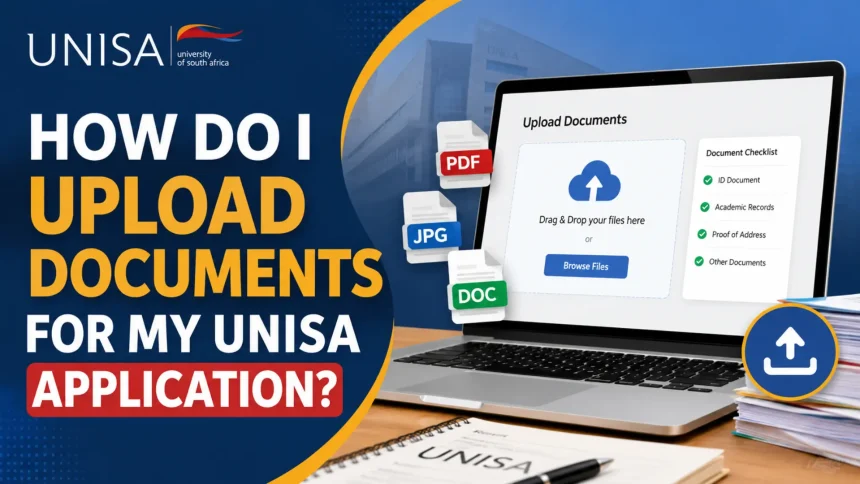
How to Upload Documents for Your Unisa Application
Uploading your documents is simple if you follow the correct steps.
Step 1: Visit the Unisa Document Upload Page
Go to the official Unisa online document upload portal using your preferred web browser.
Step 2: Select “Upload Documents”
Scroll down until you see the option labeled “Upload Documents at Unisa.” Select this option to begin the upload process.
Step 3: Enter Your Personal Information
Provide the required details exactly as requested. This may include:
- Student number (if available)
- Identity or passport number
- Full name
- Contact details
Double-check your information before proceeding.
Step 4: Choose Your Files
Click the “Choose File” button.
Locate the required document on your computer, tablet, or mobile device and select it.
Repeat this process for every document requested by Unisa.
Step 5: Upload Your Documents
After selecting each document, click the “Upload” button.
Wait until the upload is complete before moving to the next file.
Step 6: Submit All Documents
Once every required document has been uploaded successfully, click “Submit Documents and Continue.”
Your supporting documents will then be submitted for verification.
Pay the Application Fee
After uploading your documents, you may be required to pay the Unisa application fee.
For most applicants, the standard online application fee is R140. Always verify the latest fee and payment instructions on the official Unisa website before making payment.
Keep your payment confirmation as proof of payment.
How to Check Your Unisa Application Status
Once your documents and application have been submitted, you can monitor the progress of your application online.
Checking your application status allows you to:
- Confirm that your application has been received
- Verify that your documents were uploaded successfully
- Track whether your application is under review
- Find out when an admission decision has been made
Regularly checking your application status ensures that you can quickly respond if Unisa requests additional information.
Tips for Uploading Documents Successfully
To avoid delays, follow these best practices:
- Scan documents in high quality.
- Ensure every page is fully visible.
- Use accepted file formats if specified by Unisa.
- Keep file sizes within the required limit.
- Name your files clearly so they are easy to identify.
- Upload only the documents requested.
- Save copies of all uploaded files on your device.
Submitting clear and complete documents can significantly speed up the application review process.
Common Mistakes to Avoid
Many applicants encounter problems because of simple errors. Avoid these common mistakes:
- Uploading blurry or unreadable documents.
- Submitting expired or uncertified copies when certification is required.
- Uploading the wrong document.
- Forgetting to click the final submission button.
- Missing the application deadline.
Taking a few extra minutes to review your uploads can prevent unnecessary delays.
Why Students Choose Unisa
Unisa has built a strong international reputation for providing flexible, affordable, and high-quality education. Its distance learning model allows students to study from home while balancing work and family responsibilities.
Students also benefit from:
- Flexible online learning
- Wide range of accredited qualifications
- Affordable tuition options
- Experienced academic staff
- International recognition
- Career-focused programmes
These advantages continue to make Unisa one of the most popular universities in Africa.
Conclusion
Uploading your supporting documents is one of the most important steps in completing your Unisa application. By following the correct process, ensuring your documents are clear and complete, and submitting them before the deadline, you can improve your chances of having your application processed quickly.
After submitting your documents, remember to pay the required application fee, monitor your application status regularly, and respond promptly if Unisa requests any additional information. Completing each step carefully will help ensure a smooth and successful application experience.